Plan your day calmly. Finish what matters.
Kanso is a quiet task app for the desktop. I built it to show what matters today, keep everything in one place, and stay out of your way.
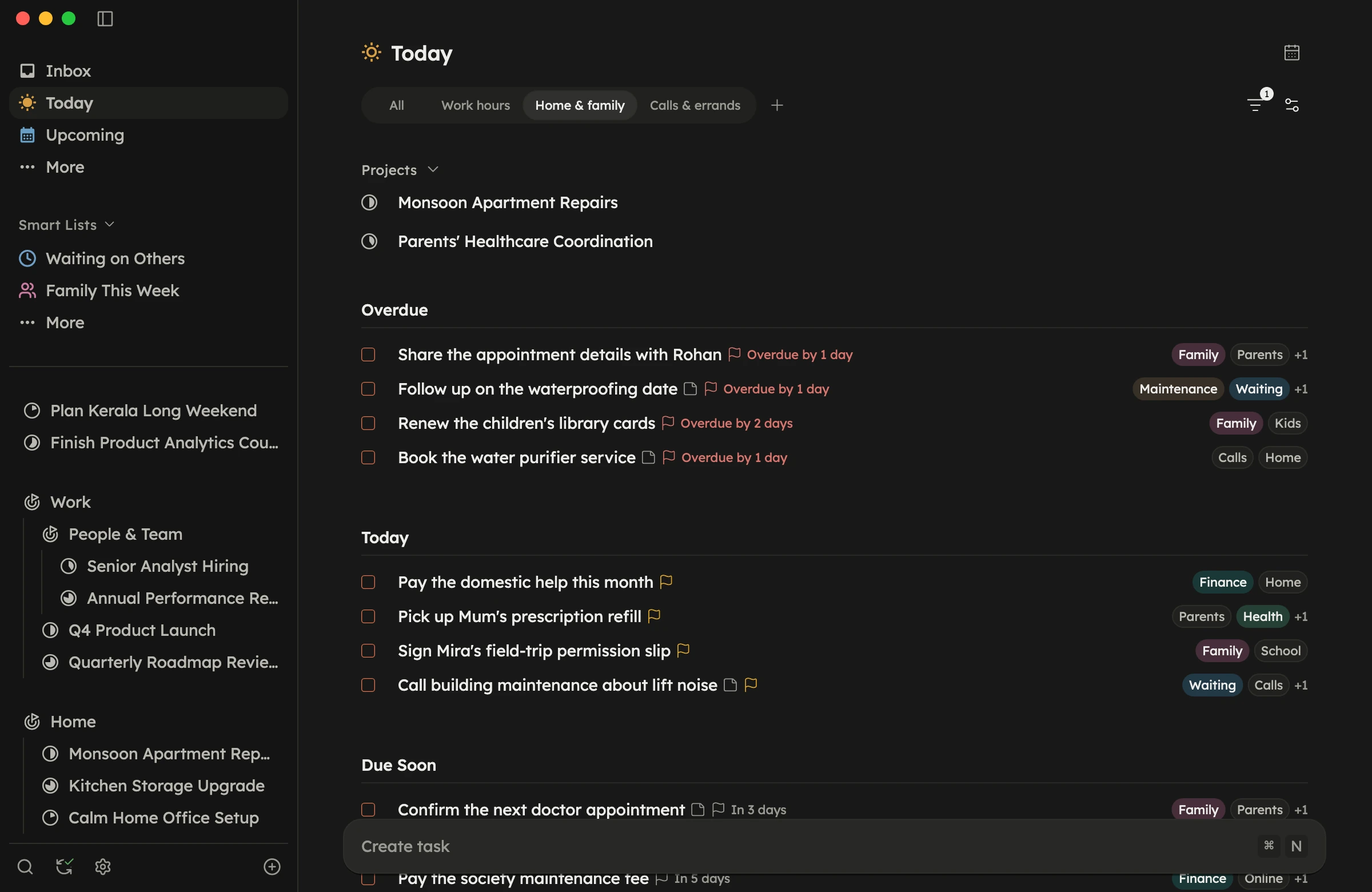
Kanso at a glance
- Works offline
- Syncs across your desktops
- Keyboard first
- No badges, no streaks
- Independently built
Capture
Just type it. Kanso sorts out the dates.
“Pay rent next Friday.” Write the task the way it left your head. Kanso turns the words into a date, so you never open a date picker.
- Type “tomorrow” or “next Friday” and it’s set.
- Say “tonight” and it waits in This Evening.
- Works on your device, even offline.
- Guessed wrong? Undo it with one keystroke.
Plan
Only what’s ready today. The rest can wait.
A task starts when you can start it, and is due when it has to be done. Kanso keeps those two apart, so Today only shows what you can actually do.
- When decides the day a task shows up.
- A Deadline is the day it has to be done.
- This Evening sits at the end of Today.
- Tomorrow shows your plan the night before.
Smart Lists
Your tasks, your way. Saved once, always current.
Save a few conditions and a Smart List gathers every matching task from all your Areas and Projects. Nothing is moved. Tasks stay where they live and show up where you need them.
- Match by tag, date, Area or Project.
- Start from a ready-made list.
- Sort and group each list your way.
- Keep your favorites in the sidebar.
Attachments
Keep the file with the task. Not three apps away.
The contract, the screenshot, the receipt. Attach it to the task it belongs to, and it’s right there when you get to the work.
- Attach files right to the task.
- Files follow you across your computers.
- Notes, steps and files in one task.
Why Kanso
The essentials, done well. A task app you can rely on every day.
Repeating tasks
Repeat on a schedule or after you finish. Skip a cycle when life gets in the way.
Reminders
A real notification at the time you choose, on Mac and Windows. Complete it right from there.
Saved views
Filter, sort and group a list the way you like, then save it as a view you can come back to.
Make it yours
Light or dark, charcoal or pure black, your accent color, and the interface size that suits you.
Nothing gets lost
Undo any recent action, restore what you deleted, and export a backup at any time.
Pay once
One price, no subscription. The iPhone and Android apps are included when they arrive.
Beta
Join the beta. Help shape Kanso.
Download Kanso, use it for your daily work, and share your feedback. Your input will help shape the future of the app.
- 01
Download Kanso
Get the app for macOS or Windows. There is no sign-up form and no waitlist.
- 02
Capture your tasks
Add tasks as they come to you. They wait in Inbox until you are ready to plan.
- 03
Plan your real days
Plan Today and use Kanso for a week. That is where the rough edges show.
- 04
Tell me what you find
Send bugs and ideas from inside the app, with screenshots if you like. I read every one.
FAQ
Questions, answered.
Something else? Write to me.
How much does Kanso cost?
Kanso is free to use during the beta, and you can buy Kanso Core for $29 at any time. It’s a one-time purchase. $29 is the launch price, and it will go up later. Once the stable version ships, every new account gets a 14-day free trial.
What happens to my tasks when the beta ends?
You keep them. Nothing is deleted or lost when the beta ends. If you have an account, your tasks are synced to your email, and you can get them back anytime by signing in. If you don’t have an account, they stay on your computer as long as you don’t sign out or delete the app.
Which platforms does Kanso run on?
macOS 12 or later on Apple silicon, and Windows 10 or 11.
Is there a mobile app?
Not yet. iPhone and Android apps are in development and will be released soon. Your purchase includes them, so you can download and use them the day they arrive.
Does Kanso work offline?
Yes. Your tasks are saved on your device, and changes sync when you’re back online.
Do I need an account?
No. You can use Kanso without one, and your tasks and attachments are saved on your device. You only need an account when you want them on your other devices.
Is my data private?
Yes. Kanso shows no ads and never sells your data, and your tasks are visible only to your account. We may add usage analytics to learn which features to improve, but they’ll never include what’s in your tasks.
Is the beta ready for daily use?
Yes. Kanso is ready for your real tasks, every day. Because it’s still a beta, you may run into the occasional rough edge, and you can export a copy of your data from Settings anytime for peace of mind.
Get started
Make room for what matters. Join the beta today.
The beta is free and open to anyone. Download Kanso for macOS or Windows, and see what today looks like with less noise.